![onside-logo 1.png]](https://info.onside.co.nz/hs-fs/hubfs/onside-logo%201.png?height=29&name=onside-logo%201.png)
You can change any of your account details you signed up with, except your email address. Currently, Onside uses your email address as the information to uniquely identify you, because of this, it cannot be changed. A new profile would need to be created (more on this here).
Updating your profile from the Onside app
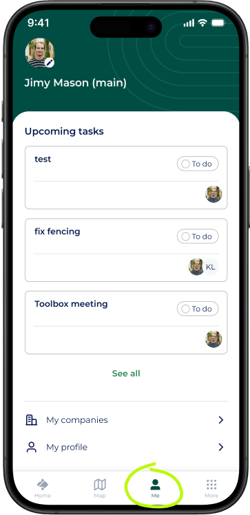
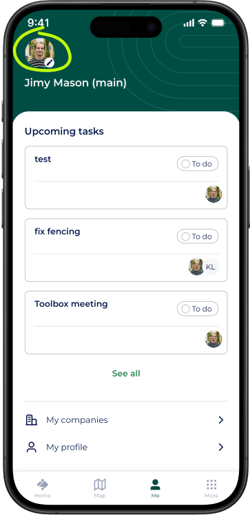
Tap the 'Me' icon in the bottom of the app, then tap the profile image in the top left or the 'My Profile' option to update it. You'll then be able to take a photo, or choose from an existing one saved on your phone as well as;
- Edit your name
- Update your phone number
Updating your profile from the web portal
Log in to your web portal via our website and click your initials or user image in the top right of the page, then 'Profile'.
.png?width=670&height=413&name=Profile%20(1).png)
From here you can;
- Edit your name
- Update your phone number
- Add a profile image
- Disable your weekly property reports (if you're an admin of a property)
- Choose to receive emails when assigned tasks
Changing your email address
If you need to change your email address, we suggest simply adding yourself to the team of your property again, with your new email (if you have admin access).
Otherwise, if you manage the account;
- Click 'Internal staff' in the sidemenu
- Add yourself with the new email address
- Click the 'Settings' tab and add yourself to become a Company Admin (access to everything on the account).
- Log out of the current account, and log in with your new email.
You may need to set a password first. Tap/click 'Sign up' in the app or web portal to finish the registration of your new account. - Then it's just a case of removing your old user.
Deleting your Onside profile
If you no longer need or want your Onside profile, you can delete it from the Onside app by following the steps below. This is irreversible.
-
While logged into the Onside app on your phone, go to the 'More' tab
-
Tap 'Privacy'
- Then 'Delete your account'.
Note: If you have created a property in your account and you are the only Company Admin for your company in Onside, you will need to delete that property from the web portal first.
If you have any questions or need any help, you can reach us on 0800 ONSIDE (NZ), 1800 112334 (AU), or email Support@onside.co
If you have an idea for an improvement to Onside, let us know here.